Friday, August 24, 2012

Using a Wiki to support Agile documentation

Currently one of the projects I’m working on is for a client in the public sector. I’m part of a team that creates specialised software to support the processes of this organization and all her partners involved in child protective services. Currently the software is being used by around 1500 personnel and this number is only expected to grow. This means that although we use an Agile way of working to develop the software, we have to create documentation for the maintenance team to maintain and if necessary further develop the application. We use a BPM suite to develop this software. As you can read from previous blog items for documentation purposes I strive to use the self explanatory models of the BPM suite as much as possible but although we can cover a great deal of the documentation need with the suite we’re using, we still have to create some extra documentation in another form than the models themselves.

More specific we document:

  • User stories, to justify the need for a piece of functionality and to steer the project
  • Acceptance criteria, as a test base and to give more functional detail to a piece of functionality
  • System test scripts, to be able to check regression and to help document more technical decisions
  • Service definition, to describe the functionality needed for interfaces to more technical parts and third party interfaces.

Using User Stories for documentation is not a straight forward process. I wonder whether the set of User Stories you use on your project, sufficiently describe the functionality of the system. I also wonder whether maintenance personnel, not initially part of the team are able to navigate the user stories and find information they need easily. In my opinion just creating a backlog does not do the trick as the set of User Stories is fairly unstructured. At the start of the project these user stories describe needed functionality and form a good basis for documentation. Later on in the project the user stories also start describing changes to the earlier functionality. If you need an overview of the functionality created you, need to read through all the user stories created about the subject.

To help with this problem, I’ve created a functional structure derived from the application. The user stories created are placed in the proper place in the structure. The structure itself comprises the processes, process tasks and lower level modules that make up the application. The names of the elements in the structure follow the names that users (and thus maintenance personnel also) find in the application (ubiquitous language). The development team links every User Story to it’s place in the structure. The result is that the User Stories can easily be found back by maintenance personnel. This enables the maintenance team, but also the development team and implementation team to retrieve the information put in the user stories and acceptance criteria. As for user stories, the structure can also be used for the system tests or any other documentation you feel is needed for maintenance.

You may ask yourself what tool is needed to create this structure? Requirements management tools are capable of doing so. The problem with these tools is that they come with a price and a learning curve. The question is, is there an inexpensive tool that is easy to learn and easy to use?  

I’ve been able to create just that: Using open source MediaWiki with CategoryTree plug-in my team is able to document the software on those parts that are not covered by the BPM suite models. Creating a sprint, adding User stories, placing these user stories in the right place of the skeleton is easy and straight forward. Navigating the structure by the maintenance team and others involved is easy and follows the structure of the application itself. Adding test scripts, storing test results and documenting service descriptions in the structure is as easy.

Working with a wiki adds to the agility of the team as it is light weight, flexible and does the job well. Working with a wiki is more easily accepted by Agile team members then more elaborate requirements tooling.  

What I’ve created is a structure for documenting software in an agile manner. I’ve created a help page with templates and guidelines on how to use this wiki. Please contact me if you’re want more information or want to get the wiki pages enabling this structure. I can help you and your team to implement this way of working, giving them a way to document for maintenance purposes.

Monday, July 23, 2012

Lean requirements in BPMS, an example

Having written quite some requirements documents and now working with current generation of BPM suites I’m seeing very interesting improvement area’s in the field of requirements. These improvement areas are supported and made possible by these powerful tools...

Hanging on to old requirements habits of specifying everything up-front and requiring sign-off of specifications before implementation, is not going to make us effective using these tools. Translating paper specifications to working software is difficult for developers, let alone for customers. As the sign-off this document becomes part of the contract, a customer will try to avoid any mistakes as he has to suffer from any rework later on. Special attention is given to getting “complete and correct” requirements … on paper...

What if we had a tool that enabled us to demonstrate 
to our customers what we have in mind directly. How different, if we could create models that are readable by customers and need no extra translation by developers. How great, if we (and our maintenance teams) would always have the corresponding version of the requirements available when looking at some implementation artifact? Sounds like a beautiful future...

I'll tell you, the future has arrived when using state-of-the-art BPM suites. I would like to give you an example on how you can exploit certain features of a BPM suite to obtain a lean requirements approach.


Requirements are implementation - Be Lean!

I would like to show you how to support business processes using IBM WebSphere Lombardi. Suppose we have the following business process to handle a Buyers Purchase Order:
figure: IBM WebSphere Lombardi Process Model

The question is: What requirements artifacts do we need to describe this process sufficiently for stakeholders to understand what’s going on and for the development team to understand what to build?

Let’s start at the process model: Some stakeholders like to get an overview of the process and get exited about process models like the one shown above. They can get an overview of who is doing what and when. They get an idea of decision moments in the flow and by analysing actual information gathered from ran processes they can optimize the flows if needed. However these models don’t appeal to everyone’s imagination... Isn’t it so that especially end-users are less interested in the overview but more in the details; that they can best contribute in the requirements process if they see the end-results of a run process, when they see forms with actual information to be entered in the right sequence.

Wouldn’t it be great if we could cater both types of stakeholders?

...the good thing is, we can...

The process model shown above is the actual executable process model in Lombardi. There is no need for us requirements people to describe it anywhere else or to clarify it anywhere else. The model neatly shows who does what, when, by showing swim lanes, process steps and process flow respectively. The model speaks for itself and since process steps are well named it is clear for almost anybody in the domain to get a good idea of what is going on...

To cater the other type of users who get excited if they see actual forms where to enter information, IBM Lombardi allows us to run the process in demonstration mode, showing mock-ups of the forms (to be described later) and to let end-users test the flow of the process by entering values and selecting scenarios showing the successive actions that take place.

Brings us to what we do have to describe apart from what IBM lombardi gives us by implementing the solution. Probably we want to give an overview of the objectives to achieve using this process model and the details of the process steps. On the details of the process steps, lets take the human step to Submit a Purchase Order, in normal requirements practices we are used to writing a something like a Use Case describing the interaction of the User with the System: we would describe the data entered and the forms used, we would describe validation rules and business rules and we would describe supplementary specifications.

Using Lombardi we can take a lean approach to providing this information and only describe those assets we can’t model in the tool directly. Let’s see what we can specify in the tool apart from the process model already described above: Domain objects, User Interfaces, Business and Validation rules, Coarse steps of the UseCase.

Domain objects

With Lombardi we describe the domain objects and data to be used in the system. Often the implementation glues together information available in various legacy systems and standard applications. Some of the processing probably takes place in the legacy systems and glues together the various systems. Often information crosses departments making it important to have a mutual understanding on the meaning of each domain element and attribute. Terms like Shipping date can easily be interpreted or defined differently over departments: one department may define the shipping date being the date where the order is picked and the box is sealed, another department may define the shipping date as the date where the order actually leaves the plant. Using the descriptions of these attributes and using business rules we can clearly define what is meant with a shipping date.

IBM WebSphere Lombardi DomainModel

User Interface

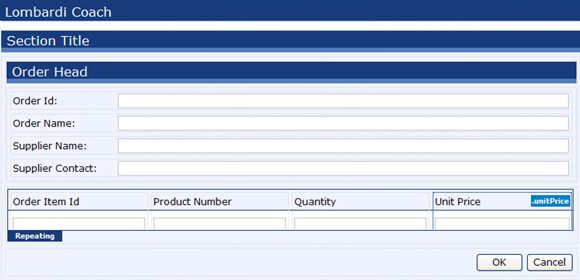
BPM suites allow us to create mock-up’s of the user interfaces or the actual user interfaces used in the system itself. The mock-up’s may not contain all details in the requirements phase, but because we can show this mock-up in it’s place in the process, we have a very effective way to communicate our ideas about the process and user interfaces. In the run down of the process the user can enter data and see if the flow of forms is correct.

IBM WebSphere Lombardi User Interface

Business Rules

Also the business rules we can describe directly in the BPM suite in a readable format. see for instance the decision table below. The headers above the table refer to classes and attributes in the domain model we have created or that we update on the fly. For us requirements people it is easy to create an executable model and have the user enter data in a form, for instance the values for updatedQuantityPercent and updateUnitPricePercent. The decision table can be used in various places: in the process flow to decide on the next step or it can be used to show or hide information in a form and so on...

IBM WebSphere Lombardi validation rule

Coarse Use Case steps

We sometimes only scratch the surface by providing and creating the models described above. Besides specifying the user's interaction with the system we often have to describe how to connect to legacy systems or how a certain task breaks down in lower level activities. We can break down the functionality in smaller steps to give more detail about the processing. Often these descriptions are sufficiently describing what is needed from a functional level. If more description is needed then describe each by specifying what the user wants to acheive with this step. Also by having these models in the tool we can easily demonstrate the working of the application to the user. Do we still need a detailed description of the workflow of the user interaction? Maybe yes...

But probably no, since we can model further details in a service:
IBM WebSphere Lombardi service

Using good naming we can put extra detail to communicate with users and for the implementation team to implement these interactions in the right order.

http://www.ibm.com/developerworks/websphere/library/techarticles/1101_wang/1101_wang.html

One of the issues with this way of using the actual models as a description of the functionality is that we have to be cautious not to stick too much detail to the first level of these models. Take the service... When detailing this service developer likely add more steps if necessary. If there is too little focus on structure we may end-up with unreadable and unmaintainable models.. be aware...

By doing so our requirements process creates the actual models and gives us the power to demonstrate the implications of choices directly getting feedback from users on actual implementation rather than on paper representation of the implementation.
I would say, no time to sit back... no time to hang on to old habits...

There are now new ways to serve our customer with way more output! Take control... add new habits, start working in an agile fashion use a lean requirements approach!
Start empowering your end-users!

Sunday, February 26, 2012

A norm for requirements in BMPS

As a requirements engineer I’ve often wondered myself about the balance between the effort put into creating specifications versus the actual usage of it. Off course development teams need some information to start working on, but the further you get in a project, the more the team knows what is going on and the less value your specifications have. Isn’t it so that specifications devalue even more when the system goes into a maintenance phase? Use cases which are very useful to develop the system are actually not so handy for maintenance as focus shifts from a development team wanting to know how the user interacts with the systems, to a maintenance team wanting to know where a certain form or business rule is used in order to make a change or an impact analysis. Keeping the specification a valuable and up-to-date asset takes a huge effort with unknown outcome...

I suppose anyone working in software development will confirm that software documentation often suffers from one or more problems below:
  • it is nonexistent or is of poor quality;
  • it is outdated;
  • it may be over abundant on some aspects without a definite objective;
  • it may be difficult to access when the are scattered on several location and in different formats;
  • it doesn’t always get the interest from the programmers that it needs;
  • it is difficult to standardize, due, for example, to project specifics.


The results of this, is that maintenance teams only trust the actual realized software system, the source code and the database tables itself. In traditional software development the source code however is hard to read. In those situations documentation is needed to explain how things work together and how requirements are implemented in the system. These descriptions however suffer from the problems listed above.

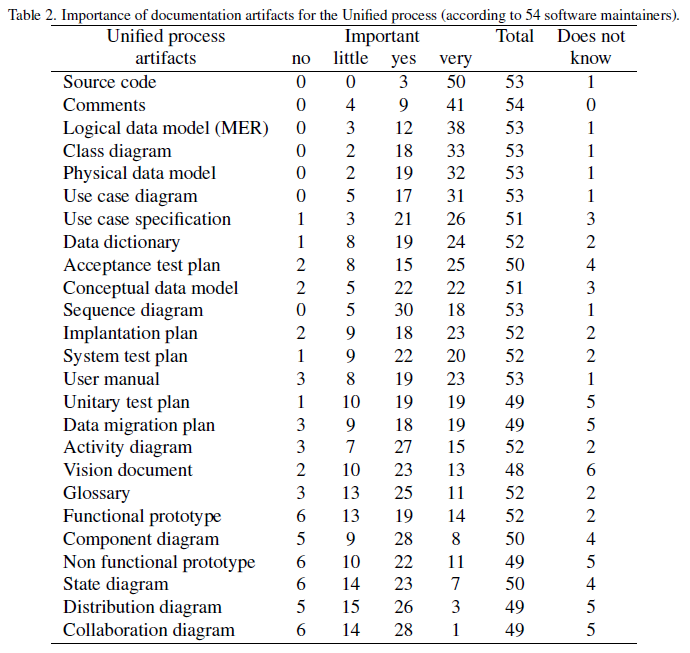
The outcome of a survey held amongst several maintenance personnel won’t surprise you, it gives an idea about what documentation artifacts are most valued by maintenance personnel probably due to the problems above:


This survey also showes that software code and comments are mostly valued by maintenance teams!

Knowing what causes the problems with documentation can help us decide on how to document in the future and what to look for in tooling to support that process.

Working in the field of BPM, I’ve found that BPM Suites offer great functionality to overcome several problems with software documentation. What the BPM suites offer in this field is based around the following four features:

  1. The first good thing about BPM suites is that the models created by BPM engineers in the suite are well readable by maintenance personnel. The models are directly executable so there is no software coding needed to translate the models into the code to create an executable. The fact that documentation lacks interest of programmers becomes less relevant since the models they create are often well readable.

  1. The second good thing is that these models correlate with assets we are used to specify, like a domain model, user interfaces and a process model. There is no need to create a written specification of these artifacts discussions on how to document belong to the past.

  1. The next good thing is that most BPM suites keep traces between implementation artifacts of different types. This makes it possible for instance to find out in which process steps a certain business rule is used.

  1. The fourth good thing about BPM suites is that requirements information is stored in the system close to the implementation artifacts helping with the access and standardization of requirements.

For a client I currently work for I’ve developed a documentation norm specifying in detail what to document in text and what to document in the suite (in this case Aquima). To get a good idea on what and how to document, I’ve started from the models often available in the suites. These models I linked to the requirements artifacts of the Rational Unified Process (RUP). Linking to RUP makes it easier for external auditors to assess the quality and completeness of the available documentation.

Please contact me for more information on the norm...

Wednesday, December 14, 2011

Pega Rocks!

Recently I gave a short presentation about Pega Rule resolution to enable delivery of enterprise software, this as part of my CSSA training. Trying to grasp the background behind the often technical descriptions of the what and how of the rule resolution process this is what I’ve come up with...


Pega is really focused on delivering enterprise wide solutions. An enterprise typically has a complex organization structure, sells more than one product or product type, has offices or branches in more than one location, sells products through various channels to several groups. One could say that the only stable factor in an enterprise is change itself:-)


Pega handles complexity really well, internally following the structure of the organisation, the products it delivers and the markets it serves. The software system which is build with Pega to support business processes, typically stays close to the organization structure of the enterprise; knowing that management at organizational, divisional and unit level all “need” their own influence on the software support of the business processes they own: Certain regulations like human resource management may be maintained at an organization level. Much functionality is likely to differ on divisional and unit level.

To allow this to work Pega breaks down functionality to the level of what they call “a rule”. Several rule types exist like flow rules to create process flows, user interface rules to create user interfaces or decision rules to store business rules. Rules can be defined at one layer and specialized on another as such allowing differences between division and unit level and in the meantime to allow compliance to certain enterprise rules defined at organizational level.

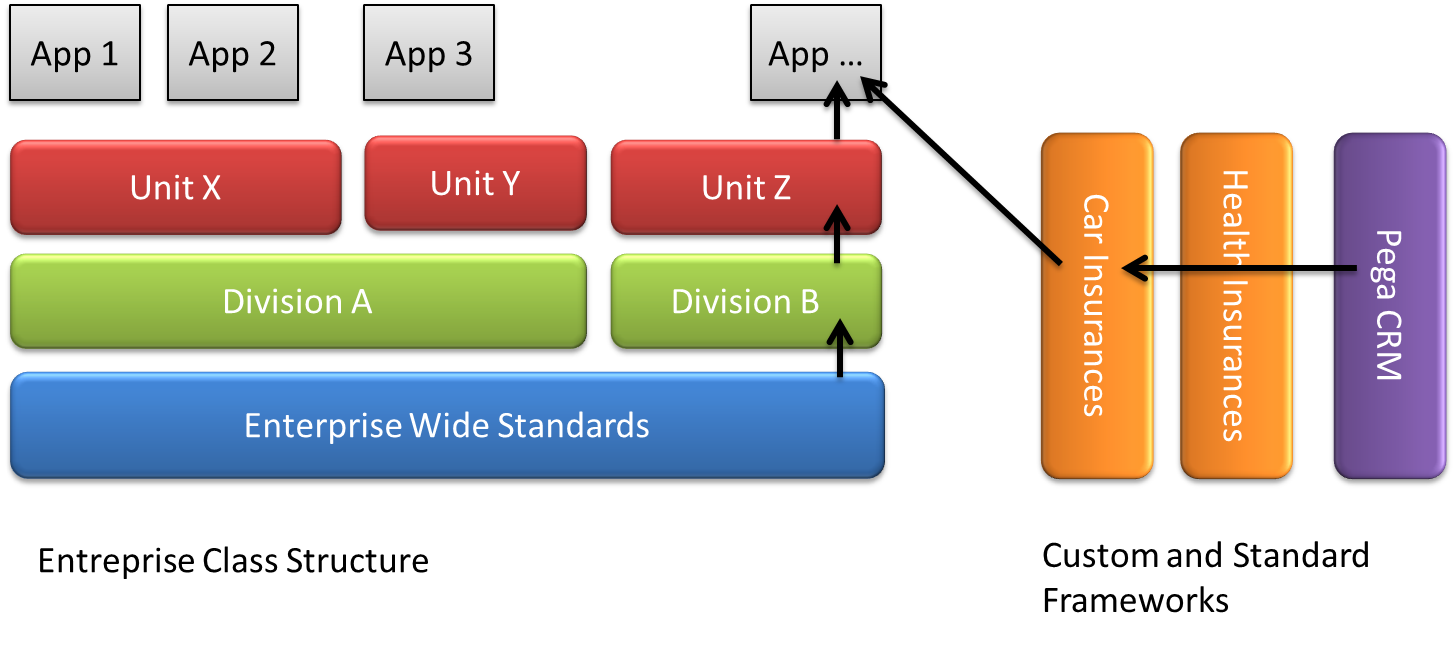
Developers will use the so called “Enterprise Class Structure” (ECS) together with “Custom Build Frameworks” (CBF) and standard Pega frameworks to obtain optimal reuse and speed of development, see the example below:


A typical application uses rules that are defined on the unit level and that inherit rules from the division and enterprise layer(s) below. Rules from framework layers can be injected using multiple inheritance paths. As such developers can create an application handling car insurance claims using the Pega CRM framework, augmented with car insurance specifics defined in the custom build framework. But in the meantime complying to the reporting requirements by using the business rules defined at divisional and enterprise level.

Development and deployment is supported by rule-sets

To allow for easy deployment, rules can be grouped in rule sets. An application typically comprises several rule-sets. Rules that make up a Custom Build Framework for instance could be stored in several rule-sets allowing for easy deployment. Rule-sets follow the structure ECS and although rules for a unit could reside in one rule-set, often different aspects of the rules in the set need to be released independently of each other. Rule sets are version-ed and versions can reside next to each other. Specific rules in a rule set may be withdrawn or blocked to allow to patch functionality and create quick fixes. Rules can be set final to make sure that the rule can not be specialized any further.

Rule Resolution makes it work

In order for this system to work and to allow for optimal reuse, Pega comes with a advanced rule resolution scheme. All rules are stored in a database under a rule name, referring to a class and a rule type. At run-time the system determines what is the most appropriate rule to run considering the operator, the operators authorizations and access to frameworks, place in the organization and so on. Besides that, the system determines the most appropriate rule on more technical aspects like the class name, circumstance values (parameters provided) and validity of the rule. And finally rules can be blocked and withdrawn to cater deployment, release schedules and quick fixes.

Pega offers an unparalleled system for reuse. It truly keeps it’s promise to deliver a system for enterprise wide software delivery... in my opinion Pega Rocks!

Saturday, December 10, 2011

Keep structure when going Agile with BPMS, refactor continuously!

BPM suite implementations highly benefit from an agile implementation approach. They are build to allow you to embrace change, add business value quickly and learn as you go. Realized by offering an integrated requirements approach, by providing decision tables to be changed by the business itself, by generating code rather than coding it and by making it possible to deploy new software with a key press.


Agile approach need constant attention to architecture

When using an agile approach you don’t design everything up-front. Remember that one of the promises of using an agile approach is to allow us to embrace change; we only want to build that piece of software that has highest business value at this moment. As Thomas Carlyle stated in the 19h century: “Our main purpose is not to see what lies dimly at a distance, but to do what lies clearly at hand.”, we in the 21th century discover that this holds true in software development so we better not take decisions on things we can only guess about; but rather focus on problems we really have to solve at this moment. The same statement holds true for the software architecture. Rather than guessing on what a good architecture could be for the envisioned solution, we now develop the architecture as we go. This means that when we implement a new piece of functionality that touches an existing part, we have to pay special attention to structure (the architecture).  If not enough attention is paid to this aspect, the structure of the solution will surely deteriorate causing severe problems: Newly added models may conflict with existing ones, models may become duplicated leading to unexpected results and to a structure which is hard to see and to maintain.


How to obtain a solid architecture in agile approaches? Refactor!

So how to continuously develop an architecture in the ongoing process of implementing pieces of software and not having an overview of the final solution. An interesting technique introduced by Martin Fowler is called refactoring. This technique is often used in traditional software development. Currently most IDE’s support basic refactorings by choosing a code fragment and choosing the refactoring to apply to it. Not only for traditional software development this technique is useful, also BPM suite implementations can benefit from it. Let me elaborate a bit on the technique itself and give you some examples.


How does refactoring work?

Refactoring is based on making small controlled changes to the software and using automated tests to validate whether the change doesn’t break down functionality. The refactorings described by Martin Fowler focus on improving one aspect of the code and for each refactoring possible side effects are described.

I will give an example of refactoring in traditional source code. Suppose we have the following source code:

if (customer.rating > 25) {
total = (price * 0.95) * (1.0 + VAT_percentage / 100.0) ;
Send();

}
else {
total = price * 0.98 * (1.0 + VAT_percentage / 100.0) ;
Send();
}

Since it is quite a small fragment we can quite easily understand what is going on. But, suppose the calculation for the total price requires adding up of order lines amounts with different VAT_percentages; code will quickly grow giving real need for more insight and structure. For the example however I will use this small fragment to explain the approach.

The first thing one could notice from the fragment, is that the calculation is duplicated. Having such duplications in the code makes it harder to maintain, and more likely that errors are introduced when changing the calculation in one part of the code, but forgetting to update it in the other. This “bad smell” can be fixed using the “Extract Method” refactoring. In our case we extract method “CalculateTotalPrice”, leading to the code fragment below:

CalculateTotalPrice(price, discountPercentage) {
return (price * discountPercentage) * (1.0 + VAT_PERCENTAGE / 100.0) ;
}

if (customer.rating > 25) {
total = CalculateTotalPrice(price, 0.95)

Send();
}
else {
total = CalculateTotalPrice(price, 0.98)
Send();
}


After running the unit tests we should find that we didn’t break anything. However should we have broken the test, it is only one little thing we have been changing and the failing result can be pinpointed to this change easily.

With this one refactoring we’ve improved the structure slightly, still some other “bad smells” remain. In the code fragment above you can see that the “Send” method  is called from both branches of the condition. This also is a well known bad smell for which refactoring “Consolidate Duplicate Conditional Fragments ” exists. After applying the refactoring we get the following code fragment:


if (customer.rating > 25)
totalPrice = CalculateTotalPrice( price, 0.95)

else
totalPrice = CalculateTotalPrice( price, 0.98)

Send();


I hope you see that the code resulting from the refactorings lead to better maintainability; less side effects if changes are made. Note that there are more refactorings applicable to the code fragement above, but for the explanation I expect this suffices.


How to apply refactoring to BPM suite implementations?

Now the question is how can we apply refactoring to models in our BPM suite. I’ll try to demonstrate how the same refactorings can be applied to a mirco-flow in a BPM suite.To understand the model I’ll describe the visual elements used (originating from Aquima’s open source BPM suite)

A flow is a graph-like structure that can consist of forms, services, sub-flows and conditional nodes. You can use flows to create event-driven applications. This means the occurrence of an event can determine the path the application is taking within the flow. The path that is taken, in its turn, determines which events may occur. (source Aquima)

A flow can be used as a starter flow that kicks of when the user has to perform a task in the process flow, or as a subflow in another flow for reuse and to improve ma intainability.

A service is used for two situations: To connecting your application with external applications or data sources and to transforming your application data, for instance for a complex calculation. Several service types come out of the box, but they can also be custom made using java or dotNet.(source Aquima)

Forms are used to interact with end-users and contain logical blocks of questions, information etc. these pages are placed in flows. They publish events that can be catched in a process flow.

Now we know what a micro-flow is made of, we can look at a micro-flow found in an implementation below. The subsidy request form shows all kind of information needed for a subsidy request to be made. One of the options clients can choose from is to look for an subsidy advisor. Advisors typically work for an organisation and this organization may or may not have been chosen in a previous process step. 

Mirco-Flow showing a form, conditions, services and subflows

One good practice is to model a flow, showing sequential steps top-to-bottom or left-to-right but not mixed. Doing so will already reveal issues more easily...

Mirco-Flow showing modeled flow top-down not changing any connection

A first “bad smell” from the model is the double check for the subsidy type on both sides of the condition is organization known. A first refactoring “Consolidate Duplicate Conditional Fragments” is used to remove the double, see the resulting flow below. Applying this refactoring results in the following flow.

Micro-flow after “Consolidate Duplicate Conditional Fragments” refactoring

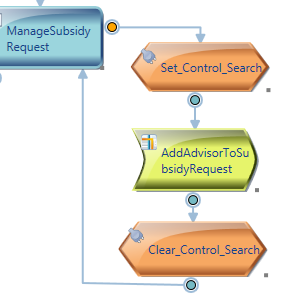
The service set_Control_Search however is to set the functioning of the subflow, by setting a Control Parameter. To make the sub flow more reusable this control remains outside the sub flow.

Micro-flow after changing the order of activities

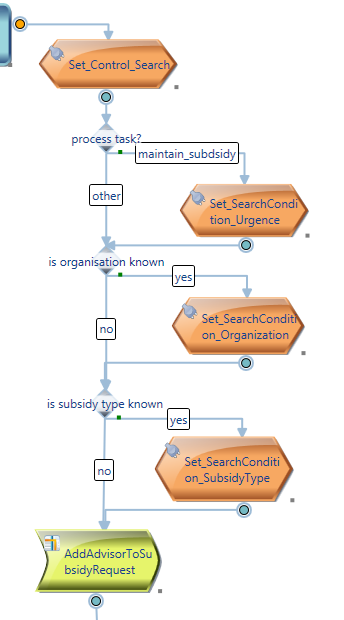
Three activities in the flow set an element in the search condition. This search condition is further detailed and used in the sub-flow “addAdvisorToSubsidyRequest” (not shown here) to make a selection of all available advisors. Apparently this micro-flow grew and some elements that actually belong closer to the addAdvisorToSubsidyRequest sub-flow where placed outside of it. The intent of the flow becomes less clear because one can only grasps it, analyzing the services. We use refactoring “Extract method” to add the services to the already existing addAdvisorToSubsidyRequest sub-flow. The remaining flow is shown below:

Micro-flow after “Extract Method” refactoring
I hope you agree with me that the readability of the flow has improved enormously. Using a complementary test driven approach makes it possible to test every single step in the process and validate that the model still produces the right results. Structure has improved leading to better readability and better reusability of assets. Other analists can more easily grasp the intent of the flow which leads to better understanding, quicker bug-fixing and better maintainability.


Some difficulties with refactoring micro-flows

Although several refactorings presented by Martin Fowler, can easily be translated to their BPM suite model counterpart, there are also some difficulties with refactoring micro-flows depending on the possibilities the specific BPM suite offers:
  • As it isn’t always possible to parametrize a micro-flow or flow element it becomes harder to reuse the flow or element and makes it impossibly to apply certain refactorings proposed by Martin Fowler.
  • It may or may not be easy to copy flow elements between different micro-flows making it easier or more difficult to move functionality from one place to the other which is necessary to apply certain refactorings swiftly. Refactoring flows can be a quite tedious job if their is no good support to move items around.
  • Creating unit tests may lead to some challenges depending on the BPM suite used. If the BPM suite doesn’t support automatic testing, It may require you to use a test robot to set certain values in a form and press buttons to  kick off a micro flow.

and finally...

I hope you will come to appreciate Martin Fowler’s work on refactoring as I do. In the description above I’ve shown you some refactorings in action for the micro-flow model in a BPM suite implementation. Different types of models in BPM suites benifit from different refactorings. The question that keeps me busy these days is what specific BPM suite related refactorings can help us structuring our work further... I am open to suggestions:-)
http://sourcemaking.com/refactoring

Wednesday, December 7, 2011

Live by the principles of the agile manifesto and raise the bar by using your craftsmanship!

The agile manifesto states: “We are uncovering better ways of developing software by doing it and helping others do it. Through this work we have come to value:

Individuals and interactions over processes and tools
Working software over comprehensive documentation
Customer collaboration over contract negotiation
Responding to change over following a plan

That is, while there is value in the items on the right, we value the items on the left more.”

When applying agility in a project and starting with the items on the left on this scale, the question is, how little processes and tools, documentation, contract negotiation and planning is needed to successfully deliver. Project approach influencers like the technical complexity, the amount of stakeholders involved or the functional complexity of the project may force teams to use some level of process, contract negotiation, documentation or planning. Different agile methods focus on influencers or try to avoid risks differently.
Several Agile methods exists… Hey! Is this not a “contradiction in terminus”, the agile manifesto states “Individuals and interactions over processes and tools”. Apparently some amount of process is required…And if one looks at the several agile methods that have seen the light, as with any process, they try to solve a specific problem or are good at handling a specific risk: the scrum method for instance has its focus on project management and requirements management … XP focuses on continuous integration and coding practices. As with most things in the world once successful they have the tendency to grow and unfortunately sometimes in wrong directions… some methods however stay on their home ground, concentrate on specific risk and can therefore be combined easily to complement each other. An often used combination for instance is Scrum for project management and requirements management, XP for the more technical aspects using pair programming, test driven development, refactoring and continuous integration. I personally favour the combination of Scrum, XP and augmented with Smart Use-Cases for requirements definition and estimation. The strange thing is: while there is quite some process involved, still we call these agile approaches, how come? The answer on this question you can find in the principles underlying the agile approaches:
  • Our highest priority is to satisfy the customer through early and continuous delivery of valuable software.
  • Welcome changing requirements, even late in development. Agile processes harness change for the customer's competitive advantage.
  • Deliver working software frequently, from a couple of weeks to a couple of months, with a preference to the shorter timescale.
  • Business people and developers must work together daily throughout the project.
  • Build projects around motivated individuals. Give them the environment and support they need, and trust them to get the job done.
  • The most efficient and effective method of conveying information to and within a development team is face-to-face conversation.
  • Working software is the primary measure of progress.
  • Agile processes promote sustainable development. The sponsors, developers, and users should be able to maintain a constant pace indefinitely.
  • Continuous attention to technical excellence and good design enhances agility.
  • Simplicity--the art of maximizing the amount of work not done--is essential.
  • The best architectures, requirements, and designs emerge from self-organizing teams.
  • At regular intervals, the team reflects on how to become more effective, then tunes and adjusts its behavior accordingly.
Following these principles is what makes your team become agile, it is not in applying a specific method or technique. Writing Scrum Storyboards or creating XP-Unit Tests don’t make your approach agile, and while some techniques don’t work together well with an agile approach, many can be adjusted to do so: Writing a full functional design won’t contribute to the agility of your approach, but using functional decomposition to break down functionality in more manageable blocks may. Also detailing a 12 page Use-Case to describe functionality will not contribute, but describing functionality in the form of a dialog between the user and the system makes a good format to investigate the users interaction with the system.
So my advice: Live by the principles of the agile manifesto, but raise the bar applying your craftsmanship!
http://manifesto.softwarecraftsmanship.org/

Thursday, December 1, 2011

Change your requirements habits: get Lean using your BPMS

Many BPM suite implementation projects still use a traditional requirements approach, either based on functional designs or on Use Cases. I’ve found that although these approaches lead to results, they don’t benefit the full potential of current BPM suites making design, development and maintenance harder than necessary -  ultimately not fulfilling the promise of obtaining agility in business’ process management...

Traditionally trained requirements personnel are likely to put much effort in creating a paper based specification of the software. This specification comprise documents describing use cases, process models, non-functional specifications and so on. Input documentation like stakeholder requirements, descriptions of business rules and regulations are referred to using text based links. Specifications are often verified and signed off by business personnel to become “the truth” for all  developers, testers and the implementation team. The value of these specifications is likely to deteriorate over the course of the project. Reason for this is that maintaining the elaborate set of documentation takes a big effort and adds only little value since team members get more and more knowledge about the domain themselves. Bug fixes and change requests augment the documentation set and more information is described in more places. Over the course of a project, the actual database model, the application flow, end-user documentation, web-forms, generated reports and source code become the truth, that is what everyone can depend on to be the actual status. The paper documentation, although often containing information not present elsewhere deteriorates.

Modern BPM suites offer very interesting options to make the requirements process more effective and make it lead to more durable results, taking away some of the problems described above. This is based upon the fact that the suites allow business people and IT personnel to share their work spaces and work together on developing software from their own perspectives. The actual software is generated from the models rather than that it is coded by IT personnel. Documentation is generated from the suite and will always give the up-to-date view of the software.  


Decision table modeled in the suite.

Let me give some examples as to how the requirements process can be improved using some great options of modern BPM suites:

  • Store Business requirements and regulation documents in the suite. Create links from the relevant text fragments to the artifacts where they are implemented. Having traceability from the actual documents used by the business will give good support for impact analysis and help to audit compliance.
  • Maintain specifications like use cases in the suite as close to the implementation as possible. Don’t create specifications if you can create a self explaining implementation artifact directly: rather than specifying a decision table in a paper document, create the table in the suite directly. The specification when linked to implementation artifacts, glues together functionality and forms a means for controlling the project.
  • Create mock-ups of forms using the functionality of the suite to form a great means for requirement elicitation. Especially end-users can contribute effectively when they see what they are actually going to get. For developers these mock-ups form a good starting point as they are already in the right place and don’t have to be translated from a paper representation. In many cases the forms are linked to a Use Case, to the process flow and refer to the domain classes.
  • Develop the process models and task flows directly in the suite to be able to walk through the created process, debugging and demonstrating the process flow to end users. This can be done by manually deciding where the flow is continuing and by responding to mock-up forms as created and attached to the right steps in the process.
  • Maintain Business rules directly in the system using decision tables, decision trees and expressions and allow business analysts to change these rules themselves and give them opportunities to take IT support matters in own hands as much as possible.
  • Maintain domain entities in the suite itself. Define and maintain relationships between the domain entities, define attributes and specify default value or value lists and let the generators take care of database specific implementations.

These are some ideas as to how you can model in a BPM suite directly and prevent double documentation. As I said in the beginning of this item and I hope you come to appreciate a bit, is that a traditional approach will work, but using the possibilities of the BPM suite will make your work more fun, will produce better results in shorter time and will ultimately lead to a better adaptable solution, happier customers and happier end-users:-)